Product Description
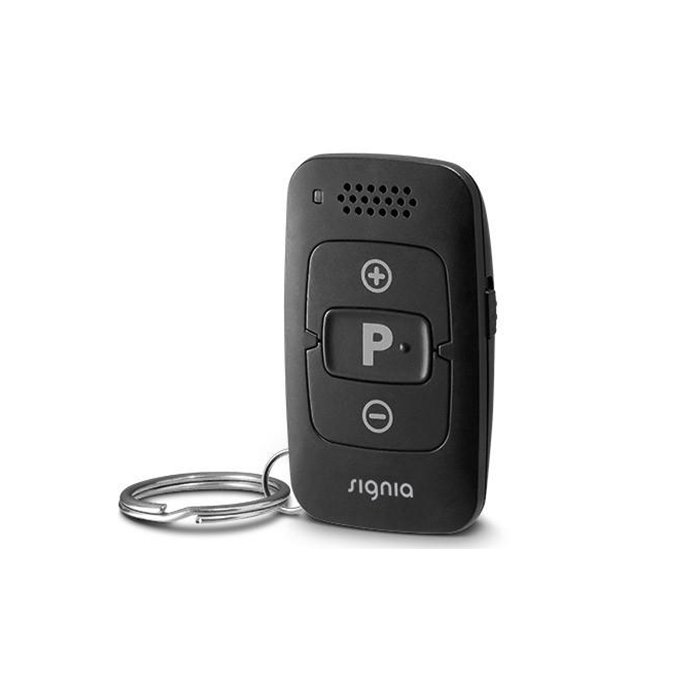
The ideal solution for anyone who wants discreet, convenient control of their hearing aids without the need for a large remote control or smartphone. Reliable and easy to use, the miniPocket is small enough to carry on a key ring yet powerful enough to control all essential features.
Signia MiniPocket Remote at A Glance:
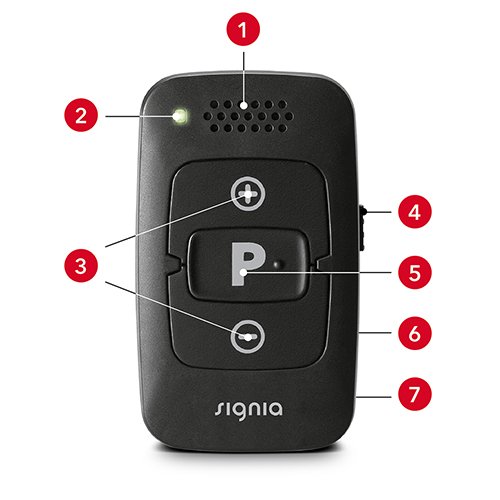
- 1. Loudspeaker
- 2. LED signal indicator
- 3. Volume buttons
- 4. Key lock
- 5. Program change button
- 6. On rear side: Battery compartment
- 7. On rear side: Opening for key ring
How to use miniPocket Remote:
How to pair miniPocket Remote:
Warranty
All hearing aid accessories offered by PUB HEARING include a 12-month warranty from the manufacturer against defects.
Shipping
Do You Offer Free Delivery?
Yes, delivery is free for all orders over $500.
Do You Offer Quick Delivery?
You can expect to receive your hearing aids or accessories within 7-10 business days from the date of your order.
However, in certain cases-such as when the item is not in stock, affected by logistics or customs delays, or is a customised order-delivery may take up to 4-7 weeks.
Can I Pick Up My Items From Your Store?
No. PUB Hearing is 100% online discount retail store and this is how we keep our overheads low and pass the savings onto you.
FAQ
Which hearing aids are compatible with the miniPocket Remote?
- Signia IX hearing aids
- Signia AX hearing aids
- Signia X hearing aids
- Signia Nx hearing aids
How to use the miniPocket Remote?
Ensure that the remote in unlocked on the side of the device.
- Press “+” or “-“ to increase or decrease the volume of the hearing aids.
- Short press the “P” button to change the program.
- Press “P” for 2 seconds to set your hearing aid to program 1 at default volume level.
- Press “P” and “-“ at the same time for 2 seconds to turn the hearing aids off. Repeat to turn it back on.


 Free Delivery Worldwide
 Best Price Guaranteed